

 NewsLetter
 Bookmark
 Submit News
 Email Us
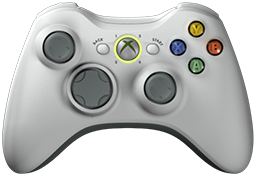 x360ce v4.29.62.0 is released. Xbox 360 Controller Emulator (a wrapper library that translates the xinput calls to directinput calls) which allows your controller (GamePad, Joystick, Wheel, ...) to function like an Xbox 360 controller on a Windows PC. For example it allows you to play Grand Theft Auto (GTA) game with Logitech wheel.
x360ce Changelog:
Fixed: Bug report recordings no longer say a controller's centring is off when x360ce never changed it.
Fixed: Bug report recordings no longer read the wrong XInput place when a real controller holds an earlier one.
Fixed: Pictures on buttons line up with their text, also when greyed out.
Fixed: The Cloud page waits longer after each failed send and stops after 4 tries.
Fixed: Boxes on the Options page and the Hardware window no longer touch.
Fixed: The Devices page shows the Hide box only for devices that can be hidden.
Fixed: A change of Windows settings no longer pauses controllers for a second (Issue #1633, KhaledElSaiad).
Fixed: Updating x360ce no longer freezes the window or leaves files behind.
Fixed: The main window is tall enough for its page when it opens at its saved position.
Fixed: The Issues tab says when HID Hide is hiding controllers from x360ce (Issue #1633, KhaledElSaiad).
Fixed: The XInput values shown no longer freeze after the error window is closed.
Fixed: The window disappears as soon as x360ce is closed, and controllers are released first.
Fixed: x360ce checks files and drivers only when something changes.
Fixed: x360ce reads empty XInput places only when a device is added or removed.
Changed: Vibration updates only the motor that changed, as 4.17 did (Issue #1633, KhaledElSaiad).
Changed: The Left Thumb and Right Thumb pages are now Left Stick and Right Stick.
Changed: [Invert], [Recentre] and [Turbo] moved under [Adjust] in the mapping menu.
Changed: Sliders have their name on the left and no tick marks.
Changed: The General page shows each control's value under its name.
Changed: The Buttons page has new button pictures and arrows, sharp at any screen scale.
Changed: The About page opens on a Program tab with the links, the authors and the credits.
Changed: The About page has a smaller heading, so its tabs start higher.
Changed: x360ce now connects to the online database at its new address.
Changed: [Theme] moved to Options > Appearance.
Changed: [Developer Tools...] moved into Options > General > Developing.
Changed: The Controller page's General tab spaces its boxes like the other pages.
Changed: The main window first opens tall enough for the whole Controller page when the screen has room.
Changed: Lists fill the page from edge to edge, with more room for titles and the first column.
Changed: Remap All moves to the next control as soon as the controller is back at rest.
Changed: The Cloud page does nothing while no tasks wait, and sends them when the network returns.
Changed: AI assistants read the program's controls faster.
Changed: When you switch windows, x360ce checks only programs named like a listed game.
Changed: A change on one controller page saves only that page.
Changed: x360ce no longer wakes 20 times a second once it has started.
Changed: Controllers no longer wait for the issue check or the tabs at start-up.
Changed: Resizing the window and switching the theme are faster.
Changed: Dragging the window's edge is smooth: the page is laid out when you let go.
Changed: x360ce uses about half as much CPU while idle.
Changed: The window appears at once and says Loading. Please wait... until its tabs are ready.
Changed: Tabs open as fast the first time as later.
Changed: x360ce no longer loads ASP.NET, Microsoft's website engine.
Changed: Icons are now drawn from one large picture at every screen scale.
Added: Bug report recordings name the force feedback driver, its motors, and the force calls made each second.
Added: Bug report recordings show where DirectInput and Raw Input differ, and what games read back.
Added: Bug report recordings say why a device was released, and which other controller programs are running.
Added: [Adjust] > [Round Dead Zone] gives a stick one round dead zone.
Added: Auto Preset maps controllers listed in SDL's controller database.
Added: Copy Preset and Paste Preset also work in SDL's format.
Added: An SDL page on each controller, and an SDL tab in Load Preset.
Added: Options > HID Hide installs and updates HID Hide.
Added: Options > HID Hide shows help for HID Hide.
Added: [Retry] on the Cloud page sends failed tasks again.
Added: Options > Appearance sets the program's font, with Selawik built in.
Added: Code and logs use the built-in Inconsolata font once you choose a font.
Added: Options > Internet sets where the SDL controller database is downloaded from.
Added: Options > Appearance > Size sets the interface font size.
Download: x360ce v4.29.62.0
Source: Here
2026-11-08
Tags:
Console,
Official_Build,
x360ce,
XBox


 Posts



Random Related Topic
0 Comments
Post a Comment
Can't post a comment? Try This!