

 NewsLetter
 Bookmark
 Submit News
 Email Us
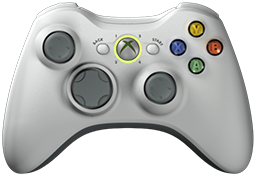 x360ce v4.19.17.0 is released. Xbox 360 Controller Emulator (a wrapper library that translates the xinput calls to directinput calls) which allows your controller (GamePad, Joystick, Wheel, ...) to function like an Xbox 360 controller on a Windows PC. For example it allows you to play Grand Theft Auto (GTA) game with Logitech wheel.
x360ce Changelog:
Fixed: Turning off the XInput reading lit every controller tab red, as though the emulated controller had gone.
Fixed: Controllers were read slower while the window was open.
Fixed: Closing the program could end it with an error instead.
Fixed: Unplugging two controllers at once removed the wrong one, or closed the program.
Fixed: Pointing at a list while a row was being removed closed the program.
Fixed: Changing the game while a list was updating closed the program.
Fixed: Force feedback closed the program on games that do not use a virtual controller.
Fixed: Windows refusing to open a folder closed the program.
Fixed: Controllers were added to the list in the reverse order they were found.
Fixed: Direct Input tab hid the slider and point-of-view lists behind the axis list.
Fixed: Direct Input tab hid its identifier and count fields behind the wider boxes.
Fixed: Force feedback did nothing on games that do not use a virtual controller.
Changed: Get XInput State is now Show XInput State, which is what it does.
Changed: Status bar readings hold their place instead of sliding as numbers change.
Changed: A virtual controller failure now says which failure it was.
Changed: Pointing at anything shows its name and what it does in the header.
Changed: Controls tell screen readers what they do, not only what they are called.
Changed: A full virtual controller bus is no longer reported as a fault.
Changed: Direct Input tab arranges itself as the window is resized or the display is scaled.
Changed: Every input has a name that screen readers and automation tools can read.
Added: Help page explains what the light on each controller tab means.
Added: Window opens where you left it, on the screen you left it on.
Added: Program can write out a description of every part of its interface.
Added: Options has a Settings tab that shows where your settings are kept.
Added: Settings can be kept in your own user folder, where no other account can lock them.
Added: Button that opens the settings folder in Explorer.
Added: Settings are copied and checked one file at a time before the old copy is removed.
Added: Settings can be moved and the old folder pointed at the new one.
Added: Program offers to try again or use your own folder when settings cannot be saved.
Added: Draw button in the status bar stops the lists redrawing while the program keeps running.
Download: x360ce v4.19.17.0
Source: Here
2026-08-30
Tags:
Console,
Official_Build,
x360ce,
XBox


 Posts
Posts



Random Related Topic
0 Comments
Post a Comment
Can't post a comment? Try This!